Find the code menu
Destructoid and CodesDex both describe a cogwheel in the upper-left corner of the game screen. Open it, paste the code into the entry field and choose Submit. This is a reported route, not an in-game test by this guide.
Destructoid and CodesDex report the code and reward. They are third-party guides, not developer announcements. We have not independently tested the reward or redemption flow in-game.
Destructoid code report · CodesDex code listWhy does the older illustration show a lobby area?
The original October 22 report describes walking into a Redeem Reward Code area near the training dummies. We retain the illustration below as that report’s account; it does not establish that the area still exists or that both methods work. We have no developer notice explaining the difference.
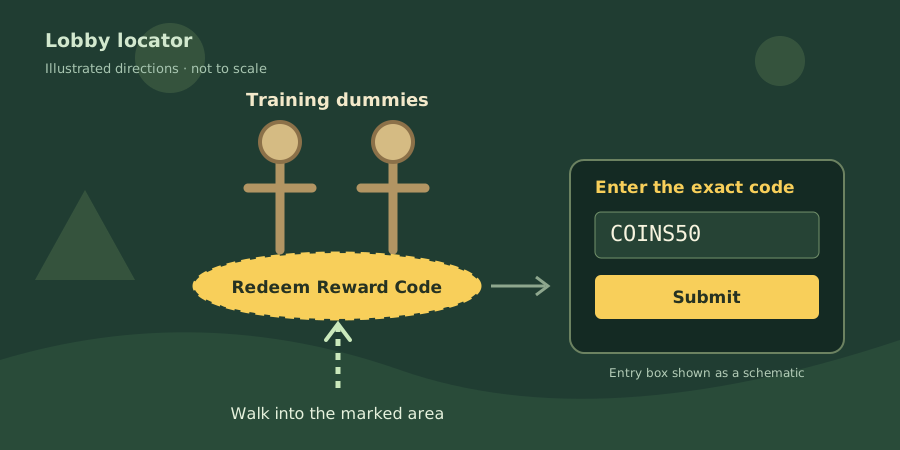
Redeem step by step
Open the correct Roblox experience
Use the Oh My Glob Games experience. Confirm the title and creator before joining; several unrelated games use Adventure Time characters.
Copy a code from the current list
Open Working codes and copy the exact string. The reported code is uppercase. Avoid leading spaces, trailing spaces and punctuation.
Look for the upper-left cogwheel
The Destructoid and CodesDex guides say this opens the code entry. CodesDex calls the field “Type Code Here”. If your screen differs, compare the developer’s latest information with the older lobby report above.
Submit and look for the reward
Enter the code and select Submit. Compare your Coin balance before and after, and record any reward or response. Copying a code or seeing an unchanged screen does not prove success.
If nothing happens
The original Moryak report says the game may stay silent for an unsuccessful attempt. That is different from a confirmed “expired” message. Use this checklist to narrow down what happened.
The code was entered, but no reward appeared
Compare every character with the source, then check whether you already used it on this account. Avoid repeatedly submitting the same string. Record the visible result and your balance before drawing a conclusion.
I cannot find the code menu or reward area
First check the game’s creator. The current reports describe a cogwheel; the older source describes a lobby area. We cannot confirm why they differ. Check the developer’s latest notice and your actual screen before following either route.
The video and this guide disagree
Compare the recording date and the game identity. A newer screenshot or developer announcement can supersede these directions. The source-check date is shown above, and the guide has not been tested in-game by us.
Keep redemption inside Roblox
This page copies a text string only. It does not ask for your Roblox password, browser cookie or payment details, and it cannot credit your game account. A browser “code generator” is not part of this redemption flow.
Once the reward arrives, choose a useful next goal in the beginner field notes. If it does not arrive, keep the exact code, time and visible response when checking an official announcement.